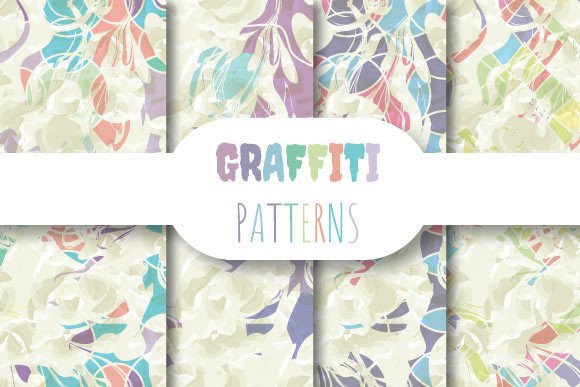
Graffiti Wall: Seamless Vector Patterns for Real Projects
When you need bold visual impact without sacrificing flexibility or print quality, Graffiti Wall delivers something rare: a set of seamlessly repeating vector patterns designed to scale, adapt, and integrate—without visible seams, distortion, or resolution loss. Each pattern is built as a true vector tile (EPS 10), fully editable in Adobe Illustrator and compatible with professional design workflows. At 12 × 12 inches and 3600 × 3600 pixels (300 dpi), the included JPEGs offer high-fidelity raster previews for quick mockups, web use, or client presentations—while the EPS file preserves infinite scalability for signage, packaging, apparel, or large-format printing.
Why Seamless Repeating Patterns Matter More Than You Think
Seamless repetition isn’t just about aesthetics—it’s about efficiency. If you’ve ever spent 20 minutes manually aligning tiles in Photoshop only to spot a mismatched edge at 200% zoom, you know the frustration. Graffiti Wall eliminates that entirely. Its patterns repeat flawlessly in any direction, meaning you can fill a business card or a 10-foot mural with the same file—no tiling adjustments, no pixelation, no guesswork. This isn’t theoretical convenience; it’s time saved during production handoffs, fewer revision rounds with printers, and consistent brand texture across touchpoints.
Consider a small-batch apparel brand launching a limited hoodie line. They need a background motif that works on fabric prints, website banners, and Instagram story templates. With Graffiti Wall, one EPS file scales cleanly from a 4-inch chest logo to a full-back print—and the four JPEG variants (different colorways or contrast levels) let designers test options fast without re-exporting. No extra plugins, no third-party scripts, no learning curve beyond standard vector tools.
Who Benefits Most—and How
Graffiti Wall shines where versatility meets precision. Freelance designers building brand identities for startups appreciate the editable vectors: they tweak colors, isolate elements, or combine motifs with custom typography—all within Illustrator. Educators creating classroom posters or workshop handouts rely on the 300 dpi JPEGs for crisp PDF exports, while keeping the EPS ready if a school later requests vinyl-cut wall decals. Marketers running A/B tests on landing pages use the JPEGs to swap background textures in Figma or Webflow—measuring engagement differences between gritty urban motifs and cleaner interpretations—without touching code.
Small business owners ordering custom packaging often hit roadblocks when vendors request “print-ready files.” The EPS 10 format in Graffiti Wall meets that requirement out of the box. Unlike PNGs or low-res JPGs, it contains live paths and swatches—not flattened pixels—so your printer can adjust ink density, convert to spot colors, or trap edges accurately. That reduces back-and-forth emails and avoids costly press checks.
Real-World Fit: When It Works Best (and When to Pause)
This collection excels when you need expressive texture rooted in street-art energy—but with professional polish. The patterns balance rawness and control: think layered spray-can drips, stenciled geometry, or chalk-line rhythm—not chaotic noise. That makes them effective for branding that wants authenticity without sacrificing clarity (e.g., a coffee roaster’s bag design, a podcast’s motion intro, or a nonprofit’s campaign poster).
That said, Graffiti Wall isn’t meant for photorealism, ultra-minimalist interfaces, or strict corporate guidelines requiring monochrome-only assets. If your project demands absolute neutrality or photographic fidelity, these patterns won’t align. Likewise, while the EPS is editable, it’s not a library of isolated icons—you won’t find individual spray-can vectors ready to drag into a UI kit. It’s a cohesive wallpaper system, optimized for coverage and mood, not modular componentry.
Practical Tips for Getting the Most Out of Your Files
Start with the EPS. Open it in Illustrator, then use Object > Pattern > Make to enter pattern-editing mode. Adjust spacing, rotation, or color groups directly—no need to trace or redraw. For print projects, assign CMYK profiles before exporting PDF/X-4; for digital, export JPEGs at sRGB with embedded profiles to preserve vibrancy across devices.
The four JPEG files aren’t random variants—they’re intentional adaptations. One may emphasize contrast for dark-mode web backgrounds; another softens edges for textile simulation; a third uses muted tones for subtle stationery. Use them as references when adjusting the EPS, or drop them straight into Canva, PowerPoint, or InDesign layouts where vector editing isn’t needed.
Need to animate? Import the EPS into After Effects via Adobe Bridge (as a composition), then apply simple position offsets to create parallax scroll effects. Because the tile repeats infinitely, looping motion feels natural—not jarring—on websites or social ads.
Beyond Decoration: Supporting Strategic Goals
Texture influences perception. Studies in environmental psychology suggest that rhythmic, layered visuals (like those in Graffiti Wall) subtly signal creativity and approachability—traits valuable for brands targeting younger professionals or creative communities. But it’s not just theory: a freelance illustrator reported a 30% increase in client inquiries after updating her portfolio site with a Graffiti Wall background. Why? The pattern added visual interest without competing with her work thumbnails—creating breathing room while reinforcing her urban-inspired aesthetic.
For educators, these patterns support inclusive design. High-contrast JPEG variants improve readability for learners with visual processing differences when used as slide backgrounds. The seamless nature also prevents distracting “break points” that can disrupt focus during long presentations.
A Note on File Management & Compatibility
All files are packaged in a single ZIP—no nested folders, no hidden layers, no license keys. The EPS 10 format ensures compatibility with Illustrator CS6 through CC 2024, and most RIP software used by commercial printers. While newer vector formats like SVG offer web advantages, EPS remains the industry standard for cross-platform print prep—and Graffiti Wall prioritizes that reliability over trend-chasing.
If you work primarily in Affinity Designer or CorelDRAW, test the EPS import first: most recent versions handle it well, though minor path flattening may occur. For pure web use, export your own SVG from Illustrator—but keep the original EPS as your master source. That preserves editability for future needs you might not anticipate today: a last-minute trade show banner, a rebranded email template, or even laser-etched wood signage where vector precision is non-negotiable.
In short, Graffiti Wall isn’t about adding “more graphics.” It’s about removing friction—between idea and execution, between screen and print, between creative vision and technical delivery. When your time is measured in billable hours or launch deadlines, having a rigorously built, field-tested pattern system isn’t a luxury. It’s infrastructure.