Tiger Safari Digital Papers: A Practical Guide for Crafters and Designers
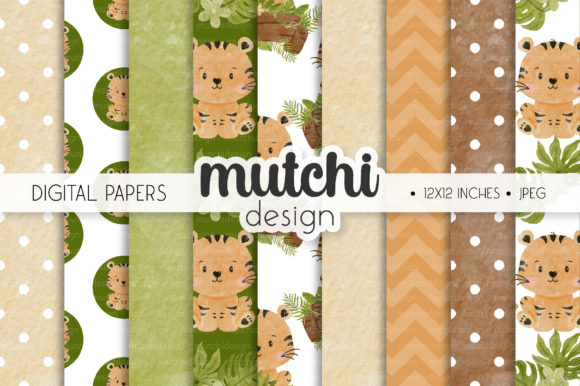
Tiger Safari Digital Papers is a curated collection of 09 high-resolution digital pattern papers, each sized at 12×12 inches and delivered in JPG format at 300dpi. What sets this set apart is its blend of thematic cohesion—centered on bold, earthy tiger motifs—and functional versatility. Unlike generic animal-themed papers or mass-produced pattern bundles, Tiger Safari Digital Papers emphasizes intentional design: textures mimic natural elements like weathered parchment or soft linen, colors are grounded in warm amber, deep charcoal, and muted olive rather than oversaturated tones, and several patterns are seamless, allowing for infinite tiling without visible repeats.
How Tiger Safari Digital Papers Fits Into the Broader Landscape of Digital Paper Resources
Digital papers fall into several broad categories: themed collections (e.g., botanical, vintage, holiday), utility-focused packs (e.g., solid colors, subtle textures), and designer-curated series with narrative or stylistic continuity. Tiger Safari Digital Papers belongs to the last group—but with notable restraint. It avoids the overly ornate flourishes common in some premium kits, instead prioritizing clean lines, balanced negative space, and repeat-friendly layouts. This makes it more adaptable than highly stylized alternatives that can dominate a layout or clash with mixed-media elements.
Compared to free or low-cost digital paper sources, Tiger Safari Digital Papers offers consistent resolution and color fidelity across all nine files—no unexpected compression artifacts, mismatched DPI, or inconsistent sizing. That reliability matters when printing physical items like jar labels or invitation cards, where pixelation or scaling errors become immediately visible. In contrast, many budget-friendly bundles include a mix of PNGs and JPGs, varying resolutions, or non-standard dimensions (e.g., 8.5×11), requiring extra time to resize or convert before use.
Strengths for Real-World Creative Work
The 300dpi resolution ensures sharp output whether you’re printing on home inkjet paper or sending files to a professional print service. For projects like custom scrapbook layouts or photo books—where fine detail and tonal gradation matter—the high resolution preserves texture depth and motif clarity. Similarly, the 12×12 inch size aligns directly with standard scrapbooking software templates and most desktop publishing tools, minimizing cropping or stretching during layout work.
Seamless patterns within the set offer practical advantages beyond aesthetics. When designing gift bags, party banners, or full-page backgrounds for greeting cards, seamless tiles eliminate visible seams or alignment headaches. You can scale them confidently across large surfaces without worrying about repeating borders disrupting visual flow—a limitation found in many non-seamless digital paper packs.
Use cases benefit from this balance of theme and flexibility. A recipe card printed on matte cardstock with a subtle tiger-striped background reads as warm and inviting—not costumey. A junk journal spread using layered Tiger Safari Digital Papers elements maintains cohesion without feeling repetitive, thanks to variation in scale, density, and motif placement across the nine papers.
Tradeoffs and Situational Limitations
Tiger Safari Digital Papers is intentionally narrow in scope: nine coordinated papers, no embellishments, no matching alphas or clipart. That focus is a strength for designers who prefer to source supporting elements separately—but it’s a limitation if you’re looking for an all-in-one kit. Users building quick party sets or printable sticker sheets may find themselves supplementing with additional resources for icons, borders, or text elements.
The tiger motif, while distinctive, carries inherent context. It works well for wildlife themes, safari parties, conservation awareness projects, or masculine-leaning designs—but less so for minimalist stationery, delicate wedding invitations, or neutral-toned interiors. If your project demands subtlety over symbolism, or calls for broader stylistic range (e.g., mixing florals, geometrics, and textures), this set serves best as one component—not the sole foundation—of your design palette.
Also worth noting: JPG format means no transparency. That’s ideal for full-coverage backgrounds and print-ready files but limits layering flexibility in digital editing workflows where transparent PNGs allow for easy overlays, drop shadows, or blending modes. Designers working heavily in Photoshop or Procreate who rely on layer effects may need to convert or trace elements—or pair Tiger Safari Digital Papers with complementary transparent assets.
When Tiger Safari Digital Papers Is the Right Fit
This set shines in scenarios where consistency, print readiness, and thematic resonance outweigh the need for variety or modularity. Consider it if:
- You’re assembling a cohesive client project—such as a photo book for a wildlife photographer or a branded party suite for a zoo fundraiser—and need reliable, on-brand backgrounds that hold up across multiple printed formats;
- You work across both digital and physical outputs (e.g., creating printable PDFs for clients while also cutting physical elements for scrapbook kits) and value predictable color rendering and sharpness at scale;
- Your workflow benefits from seamless tiling—for example, designing continuous wrapping paper for gift bags or full-bleed backgrounds for digital collages;
- You prefer starting with a tightly edited set rather than sifting through dozens of loosely related papers, and appreciate having just enough variation (stripes, organic textures, geometric interpretations of paw prints) to avoid monotony without sacrificing unity.
When You Might Explore Alternatives
Tiger Safari Digital Papers isn’t designed to replace broader resource libraries—it complements them. If your needs include:
- Multi-theme flexibility: You regularly shift between seasonal, cultural, or audience-specific projects (e.g., baby showers, corporate reports, classroom materials), a larger, categorized bundle may offer faster access to relevant styles;
- Transparency-dependent workflows: Your process relies on masking, compositing, or dynamic layering in digital illustration tools, and you need alpha-channel support;
- Customization depth: You require editable vector versions, color-swappable swatches, or SVG-based patterns for scalable crafting (e.g., Cricut or Silhouette cutting), then raster JPGs—even at 300dpi—won’t meet those technical requirements;
- Budget-first evaluation: You’re testing digital paper use before committing, or need only one or two papers for a single project, lower-cost or freemium options may provide adequate quality for short-term needs.
Practical Integration Tips
To maximize utility without overcommitting visually, try pairing Tiger Safari Digital Papers with neutral solids (kraft, cream, slate gray) or monochrome textures. This grounds the tiger motif and expands its usability—say, using a bold striped paper as an accent border on a recipe card with a plain kraft background, rather than covering the entire surface.
For digital scrapbookers, import the JPGs into your preferred software at native size (12×12 inches) and use built-in resizing tools to scale down for 4×6 photo mats or 3×4 journaling spots—avoiding interpolation loss. Printers benefit from embedding color profiles (sRGB for general use, Adobe RGB for professional proofing) and confirming bleed settings match their printer’s requirements, especially for items like jar labels or gift bag wraps.
Finally, consider how Tiger Safari Digital Papers supports—not replaces—your existing toolkit. Its value lies in focused execution: nine strong, production-ready papers that reduce decision fatigue and maintain visual integrity across diverse applications. That kind of consistency is rare in digital paper offerings—and often more valuable than sheer volume when time, quality, and thematic intention are priorities.