Rainbow Beauty Brush Strokes
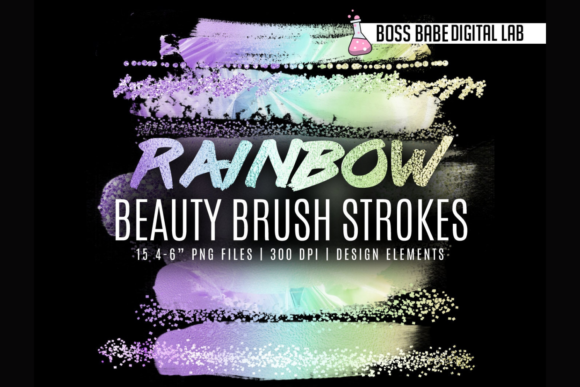
If you’ve ever stared at a flat social media post and thought, “This needs *life*—but not glitter, not a pattern overlay, just something vibrant and intentional”—you’re not alone. Rainbow Beauty Brush Strokes is a set of 15 high-resolution, transparent PNG brushstroke files designed for creators who want instant visual energy without complex design work. They’re sized between 4–6 inches, built at 300 dpi, and ready to drop into Canva, Photoshop, Affinity Designer, or any editor that supports layered PNGs. No plugins. No glitter effects that won’t export cleanly. Just bold, joyful strokes in rainbow hues—soft-edged, painterly, and fully editable.
Where These Brush Strokes Actually Fit Into Real Workflows
They’re not just “pretty extras.” They solve small but frequent design friction points—especially when time, tools, or technical limits get in the way. For example:
- A fitness coach launching a new Instagram challenge might add a diagonal magenta-to-teal stroke behind their headline text to make it pop—without needing to learn gradient masks or layer blending modes.
- A small-batch candle maker updating their Shopify homepage uses one curved lime-and-purple stroke as a subtle divider between product categories—cleaner than a line, warmer than a border, and instantly on-brand.
- An educator designing a printable classroom poster adds a soft yellow-orange arc above the title to draw attention—not with animation (which doesn’t print), but with shape and color psychology.
These aren’t decorative afterthoughts. They’re functional design elements that carry weight, guide the eye, and reinforce tone—all while staying lightweight and universally compatible.
Why They Work Where Other Options Fall Short
Many designers reach for stock patterns, overlays, or glitter textures—but those often require blending modes like “Screen” or “Overlay,” which either don’t translate in Canva or break when exported as JPG or PDF. Others rely on built-in Canva elements, but those rarely offer the same organic flow or intentional color harmony. Rainbow Beauty Brush Strokes bypass those roadblocks entirely: they’re flat, transparent, and resolution-ready. You drag them in, resize if needed (they scale cleanly up to 6 inches), and layer them behind or over text, photos, or icons—no tutorial required.
This makes them especially useful for people who:
- Use Canva exclusively—and need professional polish without switching tools;
- Design across multiple platforms (e.g., blog headers in WordPress, Pinterest pins in Canva, email banners in Mailchimp) and want consistent visual language;
- Work on tight deadlines and can’t afford to troubleshoot rendering issues or compatibility gaps;
- Want to express personality or brand warmth without relying solely on fonts or stock photos.
Bloggers & Content Creators
A food blogger adding a new recipe roundup to their site drops a soft coral-and-amber stroke beneath the main heading. It’s not distracting—it’s grounding. It signals “this is special,” without competing with the hero image. Because the file is transparent, it works equally well over light and dark backgrounds, so the same stroke can be reused across seasonal posts without re-editing.
Freelancers & Service Providers
A freelance graphic designer includes a subtle indigo-to-pink brush stroke in their portfolio thumbnail grid—not on every image, but on the “Branding” section card. It quietly reinforces their aesthetic sensibility before the viewer even clicks through. Clients notice cohesion; algorithms notice engagement. It’s micro-design with macro impact.
Educators & Course Creators
A yoga instructor building a digital course in Teachable uses one gentle arc stroke behind each module title in their syllabus PDF. It creates rhythm and visual hierarchy—something learners subconsciously register as “organized” and “intentional.” No extra software. No licensing concerns. Just clarity with color.
Small Business Owners
A boutique florist preparing weekly Instagram Stories layers a mint-and-lavender stroke behind their “Same-Day Delivery” sticker. It doesn’t shout—it invites. And because it’s a single PNG, it exports cleanly to both mobile and desktop previews, unlike animated GIFs or embedded video overlays that mute or crop unpredictably.
What to Keep in Mind Before Using Them
These brush strokes shine brightest when used with purpose—not saturation. One well-placed stroke often does more than three scattered ones. Think about contrast: if your background is already busy (e.g., a textured photo or patterned banner), try using a stroke in a neutral tone from the rainbow palette—like soft peach or dusty lavender—rather than full-spectrum neon. Also, remember sizing: they’re optimized for 4–6 inch placements at 300 dpi, which means they hold crisp detail even when printed on large-format social headers (1080x1350px or 1200x630px). But shrinking them too far—below 2 inches—can lose their painterly texture. When in doubt, preview at 100% zoom before exporting.
And while they’re designed for ease, they still reward thoughtful pairing. A bold fuchsia stroke feels energetic beside clean sans-serif type—but may clash with ornate script fonts unless balanced with ample whitespace. Try testing combinations directly in your editor: layer, adjust opacity slightly (70–90%), then step back. If it feels like part of the composition—not pasted on top—you’ve landed it.
More Than Just Color—It’s Visual Confidence
At its core, Rainbow Beauty Brush Strokes isn’t about adding “more” to your designs. It’s about adding *certainty*. The kind that comes from knowing a tool will behave the same way in Canva today, in Photoshop tomorrow, and in your client’s PDF handout next week. It’s for the blogger who’s tired of scrolling through 200 “free” overlays only to find half are low-res or watermarked. It’s for the teacher who wants her Google Slides deck to feel cohesive—not just functional. It’s for the entrepreneur who knows her audience responds to warmth, movement, and authenticity, and needs a fast, reliable way to deliver that feeling visually.
They won’t replace strategy. They won’t fix weak copy or unclear messaging. But they *will* help your visuals land with intention—so your words, offers, and ideas get the attention they deserve. Not flashy for flashiness’ sake. Just thoughtful, joyful, and ready when you are.