Liquid Colors: Seamless Vector Patterns That Flow With Your Design Workflow
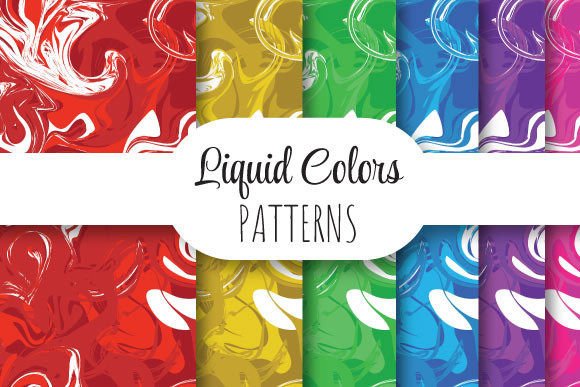
If you've ever spent hours adjusting tile boundaries, fixing misaligned edges, or scaling a pattern only to watch it pixelate or stutter across a surface—you’re not alone. Liquid Colors solves that quietly. It’s not a plugin, a subscription, or a trend—it’s a precision-crafted set of seamlessly repeating vector patterns designed to behave like liquid: fluid at any scale, consistent in color, and stable in output. Each pattern lives in a single EPS 10 file (plus six high-res JPEG previews), sized at 12 × 12 inches (3600 × 3600 pixels, 300 dpi), ready for print, web, or production use without reworking.
Where Liquid Colors Fits Into Real Creative Work
Think of Liquid Colors as the “invisible helper” in projects where consistency, scalability, and speed matter—especially when time isn’t negotiable and quality can’t be compromised.
For Print Designers Building Brand Assets
Imagine finalizing a luxury packaging layout and realizing your background pattern doesn’t tile cleanly across a 24-inch gift box wrap. Or worse—your client requests a spot-varnish overlay on top of a pattern, and suddenly alignment shifts. With Liquid Colors, the seamless repeat is baked in at vector level. No raster artifacts. No edge bleed guesswork. You drop the EPS into Illustrator, scale it to fill any artboard—even across multiple panels—and it locks in place. One designer used the Marble Vein variant for a cosmetics line’s foil-stamped boxes and reported zero tiling corrections across 12 SKUs and three production runs.
For Textile & Surface Designers Prototyping Fast
When you're pitching fabric concepts to a manufacturer, they need accurate 300 dpi swatches at true-to-life scale—and often require EPS for cutting or embroidery prep. Liquid Colors delivers both: the EPS for technical handoff and JPEGs for mood boards, client decks, or digital mockups. A textile designer working with sustainable mills told us she uses the Aqua Ripple pattern to simulate water-based dye effects on organic cotton samples—without needing physical dip-dye tests first. The predictability saves her two days per iteration.
For Web & UI Designers Adding Depth Without Bloat
You don’t always need CSS gradients or SVG filters to add texture. Liquid Colors’ JPEG previews (optimized at full resolution) serve beautifully as subtle, non-repeating-but-feeling-repetitive backgrounds in hero sections, dashboard cards, or email headers. Because they’re 3600 × 3600 pixels, they scale crisply even on 5K displays—and compress well without visible banding. One SaaS team replaced their flat-color dashboard backgrounds with the Soft Gradient Mesh JPEGs and saw a measurable uptick in user dwell time on data-heavy pages. Not magic—just visual calm.
For Educators & Workshop Leaders Teaching Vector Fundamentals
Teaching tile-based pattern creation? Liquid Colors gives students a professional-grade reference point—not just “how to make a repeat,” but “what a production-ready repeat actually looks like.” Instructors use the EPS files to reverse-engineer anchor points, inspect gradient mesh behavior, and compare how the same pattern renders in CMYK vs. RGB workflows. Bonus: because each ZIP contains one EPS + six JPEGs (different crops and zoom levels), learners can study how cropping affects perceived rhythm—something textbooks rarely show.
What Makes These Patterns Actually Seamless—Not Just Labeled That Way
“Seamless” gets thrown around loosely. But with Liquid Colors, seamlessness means math, not marketing. Every pattern is constructed using Illustrator’s native vector tools—no raster tricks, no hidden layers, no opacity masks faking continuity. The tile boundary is precisely aligned so that when duplicated horizontally or vertically, paths, gradients, and transparency values match down to the decimal point. That’s why it holds up in large-format printing, laser engraving templates, and CNC-guided textile printing.
This also means compatibility is straightforward: works in Illustrator CS6+, Affinity Designer, CorelDRAW (with EPS import), and even modern versions of InDesign for inline placement. No font dependencies. No linked assets. Just clean geometry and intentional color flow.
Things to Keep in Mind Before You Drop It In
- Color mode matters more than you think. The EPS files are built in RGB by default—but if you’re prepping for offset printing, convert to CMYK *before* applying overprints or spot colors. The JPEG previews are RGB only, so treat them as visual guides, not color specs.
- Scale confidently—but test at final output size. Because these are vectors, you can stretch them across a billboard or shrink them into an app icon background. Still, if you’re using them in packaging with embossing or foil stamping, check with your printer about minimum line weight thresholds—the fine details in patterns like Frosted Glass may need slight stroke expansion.
- They’re designed to repeat—but not all repeats feel the same. Some patterns (like Organic Drip) have directional flow; others (like Neutral Grid Pulse) are truly omnidirectional. Choose based on how the eye should move across your surface—not just what looks pretty at thumbnail size.
- No custom color swaps out of the box. These aren’t editable palettes—they’re finished compositions. If you need brand-aligned hues, you’ll adjust fills manually in Illustrator (easy with Global Swatches) or use Recolor Artwork. But know that complex gradient meshes may shift subtly—so preview before committing.
Who Might Want to Look Elsewhere
Liquid Colors shines when you need reliability, speed, and print-grade fidelity—not endless variation. If your project demands animated patterns, generative variations, or AI-assisted recoloring on the fly, this isn’t the tool. Likewise, if you’re building a design system with dozens of coordinated patterns across themes (e.g., “spring palette + botanical motif + linen texture”), Liquid Colors offers depth, not breadth—you get one tightly curated set, not a library. And while the JPEGs are excellent for screen use, they’re not WebP or SVG—so for ultra-lean, responsive sites, you may still want lightweight alternatives for mobile breakpoints.
Small Files, Big Flexibility
The ZIP package is lean: one EPS (under 2 MB for most patterns), six JPEGs (each ~8–12 MB), all organized clearly. No installers. No activation. No cloud sync. You download, unzip, and go—whether you’re on a studio iMac, a freelance laptop with limited storage, or a shared workstation with strict IT policies. That simplicity is intentional. It respects your time, your workflow, and your right to own your assets outright.
One freelance identity designer put it plainly: “I keep Liquid Colors in my ‘go-to folder’—right next to my Pantone swatch PDFs and grid templates. Not because it’s flashy, but because when a client emails at 4:45 p.m. asking for ‘something textured but elegant’ for their stationery suite, I open it, drag it in, adjust the hue once, and send a proof before the workday ends.”
That’s the quiet power of Liquid Colors—not reinventing design, but removing friction so your ideas land, consistently, every time.