Iced Coffee Digital Papers
Whether you're designing a summer-themed newsletter, launching a café’s social media campaign, or crafting printable planner stickers for a coffee-loving audience, Iced Coffee Digital Papers deliver instant visual warmth—without the drip. These aren’t just background textures; they’re versatile, high-resolution design assets built for real-world use across digital and print workflows.
What Exactly Are Iced Coffee Digital Papers?
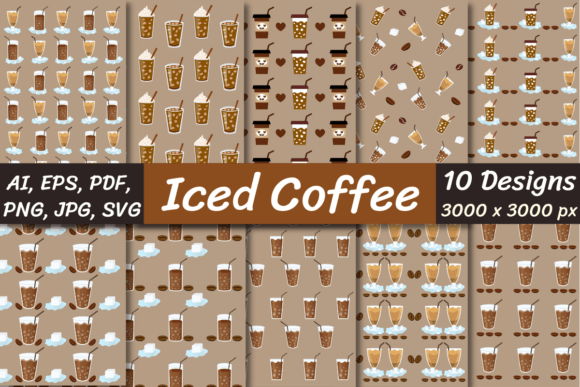
At its core, Iced Coffee Digital Papers is a curated collection of 10 seamless pattern files—each designed to evoke the relaxed, refreshing vibe of chilled coffee drinks. Think condensation on a glass, subtle straw motifs, minimalist ice cubes, soft latte swirls, and muted pastel palettes with warm undertones. Unlike generic “coffee” graphics, these patterns avoid clichés (no cartoon mugs or overused espresso steam) and instead focus on texture, rhythm, and subtlety—making them ideal for professional-grade projects where tone and cohesion matter.
Why Resolution and Format Flexibility Matter
Each paper is delivered at 3000 x 3000 pixels, giving you serious headroom: scale down for Instagram story templates without pixelation, or print at 12" x 12" for boutique packaging with crisp fidelity. The bundle includes SVG, AI, EPS, PNG, PNG with transparent background, JPG, and PDF—so whether you're editing in Canva (PNG), refining vector paths in Adobe Illustrator (AI/EPS/SVG), prepping for print production (PDF), or building a web component (SVG), you’re covered.
The inclusion of both opaque and transparent PNGs is especially practical. Need to overlay text on a light background? Use the white-based version. Building a layered UI element or sticker sheet? The transparent PNG drops cleanly into Figma, Procreate, or Photoshop—no clipping masks required.
Real-World Uses You’ll Actually Reach For
This isn’t theoretical. Here’s how professionals are applying Iced Coffee Digital Papers right now:
- Freelance designers embed them into client pitch decks for food & beverage brands—adding quiet sophistication behind product mockups or service timelines.
- Educators and course creators use the patterns as subtle backgrounds in downloadable worksheets, slide decks, or certificate templates—keeping focus on content while reinforcing a calm, energizing learning atmosphere.
- Small-batch makers (think cold brew syrups, ceramic mug shops, or matcha subscription boxes) apply them to label mockups, packaging flats, and Shopify banner images—creating visual continuity across touchpoints without custom illustration costs.
- Bloggers and newsletter writers drop them into Mailchimp or Beehiiv email headers, turning routine updates into moments of brand-aligned delight—even before the first sentence loads.
- Hobbyists and planners import the SVGs into Cricut Design Space or Silhouette Studio to cut custom vinyl decals, or layer them into GoodNotes templates for themed journaling pages.
Design Integrity Meets Practical Usability
What sets this collection apart isn’t just aesthetics—it’s intentionality. The patterns are truly seamless: no visible repeats, no awkward joins when tiled across large canvases. That means fewer hours manually blending edges in Photoshop and more time refining messaging or user flow. The color grading leans into desaturated creams, soft teals, warm greys, and muted corals—colors that pass WCAG contrast checks when paired with dark type, and feel equally at home on a luxury wellness site or a playful indie podcast cover.
And because every file is delivered in multiple formats, there’s no guesswork about compatibility. No “will this EPS open in my version of Affinity Designer?”—you have options. If you’re working in Procreate, grab the high-res PNG. If you need to recolor a motif for brand alignment, open the SVG or AI file and adjust swatches in seconds.
Smart Implementation Tips
Before downloading, consider your workflow:
- Check your unzipping tools. The files arrive in a compressed ZIP folder. While macOS and modern Windows versions handle ZIPs natively, older systems or Chromebooks may require free tools like 7-Zip or The Unarchiver. WinRAR or WinZip aren’t mandatory—but having *any* reliable unzipping software ensures smooth access.
- Organize by use case—not format. Create folders labeled “Email Templates,” “Print Packaging,” or “Social Assets,” then drop the relevant file types into each. This saves time later when you’re mid-deadline and need “the one with the tiny ice cube repeat” in under 10 seconds.
- Test transparency early. If you plan to layer text or icons over a pattern, preview the transparent PNG in your final environment (e.g., Notion, Canva, or your CMS editor) before committing to layout. Some platforms auto-add white backgrounds unless explicitly told otherwise.
- Respect licensing scope. These papers are licensed for both personal and commercial use—including client work—but always verify the included license document. Most creators find it covers digital distribution, physical products, and SaaS interfaces—but not resale as standalone digital paper packs.
When Simplicity Becomes Strategic
In a world saturated with loud visuals and algorithm-chasing trends, thoughtful restraint stands out. An Iced Coffee Digital Paper doesn’t shout—it invites. It supports your message instead of competing with it. Whether you’re a solopreneur updating your Canva portfolio, a marketing manager refreshing Q3 campaign assets, or a teacher preparing back-to-school materials, these papers offer quiet professionalism with zero setup friction.
You won’t spend hours tweaking saturation or adjusting tile spacing. You won’t second-guess whether the pattern reads as “coffee” or “generic beige.” You’ll open the folder, pick the one that fits your mood and medium, and move forward—confident it looks intentional, cohesive, and quietly compelling.
That’s the value of well-made digital papers: not novelty, but reliability. Not decoration, but foundation.